

Atlassian pricing has changed, and the change is an easy one to under-react to. Nobody is taking per-seat licensing off the table. A second layer has simply been added on top of it: five metered capability areas that bill on what you consume rather than on how many people you employ. Both layers are driven by the same number, which is how many seats you have on which plan, and that connection is what most budget conversations are about to miss. It is also why User Management and License Optimizer matters more under the new Atlassian pricing model than it did a year ago, not less.
This guide covers what actually changed in Atlassian pricing, the five meters and what each one counts, why organization-level pooling is both more flexible and harder to watch, and the seat calculation that decides how much of this reaches your invoice. If you want the tier costs themselves, our breakdown of Jira pricing plans has the current per-seat numbers.
Quick answer: Atlassian pricing is now two layers. Your seat subscription is unchanged, and a usage layer meters five capability areas on top of it: Rovo credits, automation steps, Assets objects, Bitbucket usage and CSM AI agent resolutions. Allowances pool across the organization rather than per app, and billing for most meters begins 3 December 2026.
- What actually changed in Atlassian pricing
- The five new usage meters, explained
- Why organization-level pooling changes who watches the number
- Does cutting idle seats shrink your AI allowance?
- How to prepare before 3 December 2026
- Atlassian pricing FAQ
What actually changed in Atlassian pricing
Nothing was taken away. The seat half of Atlassian pricing is untouched, and Atlassian is explicit about it: “your existing subscription and renewal process are unchanged. Usage-based pricing adds a consumption layer on top of your plan”. You still buy seats, you still renew the same way, and the per-user price of Jira Standard or Premium has not moved because of this.
The new part is that certain capabilities are now metered. Each one has an allowance included with your subscription, and consumption beyond that allowance becomes billable. Billing for most meters begins on 3 December 2026, which is roughly three months out at the time of writing.
Before anyone panics, note how much warning you are given. Atlassian states on its own pricing pages that it “is not charging for usage beyond your allowance today, and has committed to at least 90 days’ notice and an explicit opt-in before that changes”. Organization and billing admins also get notified at 80% and 100% of the included allowance, and admins can set usage limits rather than letting consumption run unbounded.
So the new Atlassian pricing does not produce a bill that arrives by surprise. It produces a bill that arrives for organizations that were not watching, which is a different and much more avoidable problem.
The five new usage meters, explained
Five capability areas are metered, listed here in the order Atlassian’s own table uses. The Bitbucket row only matters if you use Bitbucket, and the CSM row only if you run Customer Service Management. “Meter” is Atlassian’s own term here, not shorthand: its billing documentation defines a meter as “a mechanism for measuring the usage of specific features or services”, and each one carries its own allowance and is billed independently of the others.
| Meter | What it counts | Who should care |
|---|---|---|
| Rovo credits | Deep AI interactions: Rovo Chat, Confluence AI slides, the Jira coding agent, Teamwork Graph queries | Anyone piloting or rolling out Atlassian AI |
| Automation steps | Each action, condition, branch or loop an automation rule executes | Teams with mature, high-frequency automation |
| Assets objects | Object records stored in your Assets schema | JSM teams using Assets as a CMDB |
| Bitbucket usage | Pipeline build minutes, Git LFS storage, packages storage, packages network transfer | Bitbucket teams with heavy CI |
| CSM AI agent resolutions | Each closed interaction where an AI agent resolves a request without human escalation | Customer Service Management users |
One counting note, because it trips people up. Atlassian presents five rows, but Bitbucket is itself “measured across four meters”, so the strict meter count is eight. Five is the number of capability areas, and it is the grouping Atlassian’s own table uses.
Rovo credits are the meter worth understanding properly, because the allowance is generous at the top end and thin at the bottom. Atlassian publishes the per-user monthly figures: 25 credits on Standard, 70 on Premium and 150 on Enterprise for standalone Jira or Confluence. Overage, if you enable it, runs at $0.01 per credit, or $10 per 1,000.
The collections change that picture sharply. Teamwork Collection and Service Collection carry 250, 700 and 1,500 credits per user per month on the same three plans, which Atlassian describes as “up to 10x higher Rovo allowances compared to standalone apps like Jira or Confluence on the same plan”. If an AI rollout is on your roadmap, that ratio belongs in the licensing conversation well before it belongs in the overage conversation.
Atlassian pricing pools your allowance across the whole organization
This is the structural change in Atlassian pricing, and it cuts both ways. Allowances are “pooled at the org level and are shared across all users, not split per person or app”.
The upside is real. One heavy Rovo user no longer hits a personal wall while a hundred colleagues leave their credits untouched. The pool absorbs the variance, which is exactly what you want when adoption is uneven, and adoption of a new AI feature is always uneven.
The downside is that nobody owns the number. A per-app allowance has a natural owner, usually whoever administers that app. An organization-wide pool consumed by Jira automation rules, Confluence AI, a JSM agent and a Bitbucket pipeline has no single obvious owner, and the alerts at 80% and 100% land with organization and billing admins who may not know which team’s rule started consuming steps last Tuesday. Central pooling needs central visibility, or it becomes a shared resource that everyone draws on and nobody monitors. That is the single biggest operational difference between the old Atlassian pricing and the new one.
Does cutting idle seats shrink your AI allowance?
Yes, and this deserves a straight answer rather than a comfortable one, because it is the question that will be raised the moment someone proposes a licence cleanup under the new Atlassian pricing.
Your total allowance is the sum of per-user allowances across your subscriptions. Fewer seats therefore means a smaller pool. Remove 100 Jira Premium seats and you remove 7,000 Rovo credits a month from your organization’s allowance. That is a genuine reduction and anyone claiming otherwise is not reading the documentation.
Now price both sides of it. At Jira Premium’s published rate of $14.54 per user per month, those 100 seats cost $1,454 a month, or $17,448 a year. The 7,000 credits they contributed are worth $70 a month at the published $0.01 overage rate, or $840 a year. You are paying roughly 21 times over for that allowance headroom.
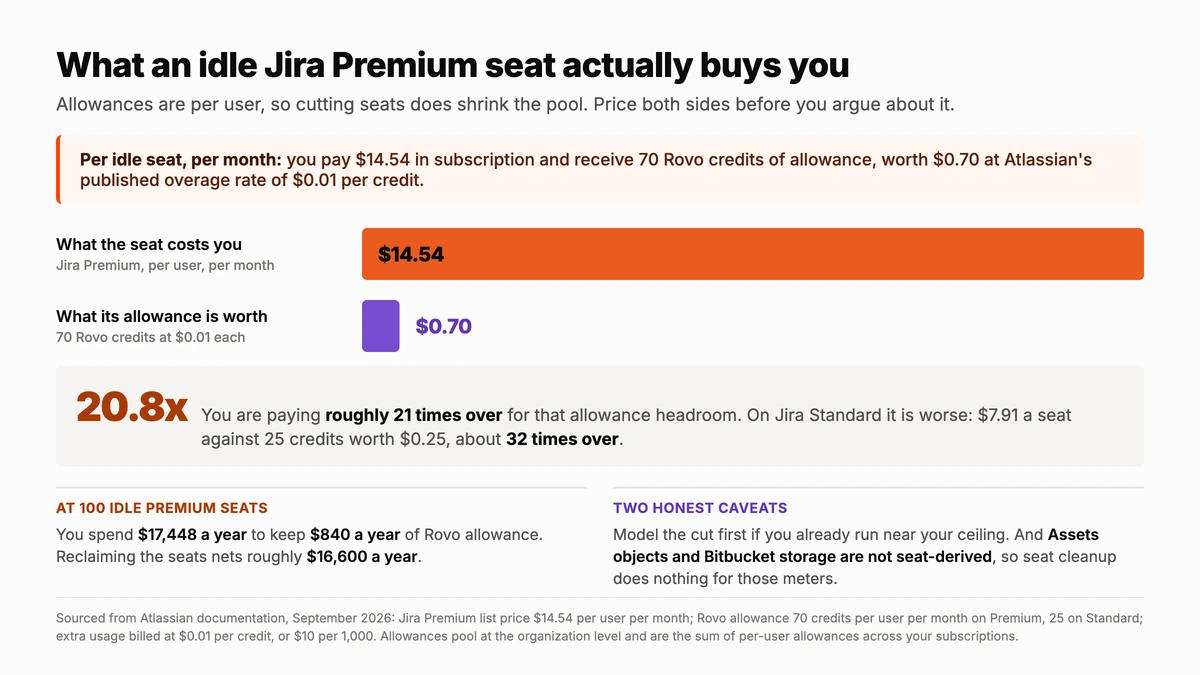
On Standard the ratio is worse, not better: $7.91 a seat against 25 credits worth $0.25, which is about 32 times over. And the users whose seats you would reclaim are, by definition, the ones not consuming credits in the first place. Their allowance was padding for everyone else, bought at a spectacular markup.
Two honest caveats. First, if you are genuinely running close to your allowance ceiling today, model the cut before you make it rather than after, because losing headroom you are actively using is a real cost even when the ratio favours cutting. Second, not every meter is seat-derived. Assets objects and Bitbucket storage scale with what you store and build, so seat cleanup does nothing for those. Judge each meter on its own terms.
Know exactly how many seats you are paying for
User Management and License Optimizer shows active and inactive users across every site in your Atlassian organization, filters them by inactivity, role, group and domain, and reclaims idle seats on a schedule. Every run is logged for audit, and Organization Administrators are excluded automatically.
How to prepare your Atlassian pricing before 3 December 2026
Three months is enough time to do this properly and not enough to leave it until November. The work splits cleanly into knowing your baseline and then controlling it.
- Establish your seat baseline per product and plan. Not accounts, seats. The two numbers are usually further apart than people expect, and every downstream figure in this exercise depends on getting it right.
- Reconcile seats against actual activity. Product access is what Atlassian bills, not logins, which is why an account nobody has opened in a year costs exactly the same as your busiest engineer. Our guide to which users actually consume a licence covers the mechanics.
- Check your current consumption on each meter in Atlassian Administration, while it is still free to be wrong about it. A baseline taken now is worth far more than an estimate taken in December.
- Set usage limits and confirm who receives the 80% and 100% alerts. An alert that reaches a billing admin who cannot identify the offending automation rule is not a control, it is a notification.
- Model the collections question honestly. If AI adoption is on the roadmap, the up-to-10x allowance on Teamwork or Service Collection may change which licensing shape is cheapest overall. Model it against your seat count rather than assuming, because collections change the Atlassian pricing shape more than they change the sticker price.
- Make the seat pass recurring, not one-off. A cleanup buys back a number that starts climbing the next day. A saved filter for inactivity, run monthly, keeps it flat between renewals.
Steps one, two and six are the work User Manager automates. Filters run across every site in your Atlassian organization at once, scheduled tasks apply the action, and each run is logged. Organization Administrators are excluded from automated actions and that cannot be overridden, which is what makes recurring cleanup safe to leave switched on. If your data freshness matters at this scale, continuous sync via Atlassian Guard narrows the window between a change happening and the app seeing it.
Two limitations worth stating before you start: bulk operations cannot be automatically undone, so test on a small group and keep the downloadable results, and SCIM-provisioned groups are read-only, so those changes have to happen in your identity provider.
Atlassian pricing FAQ
Is Atlassian pricing still seat-based?
Yes. Per-seat licensing remains the foundation of the bill. Atlassian pricing is now two layers: your existing per-user subscription, unchanged in structure and renewal, plus a usage layer that meters five capability areas and bills consumption beyond an included allowance.
What are the five new Atlassian pricing meters?
Rovo credits, automation steps, Assets objects, Bitbucket usage and Customer Service Management AI agent resolutions. “Meter” is Atlassian’s formal term, defined in its billing documentation as a mechanism for measuring usage of a specific feature or service. Note that Bitbucket is itself measured across four meters, covering pipeline build minutes, Git LFS storage, packages storage and packages network transfer, so five is the number of capability areas and eight is the strict meter count.
When does usage-based billing actually start?
Billing for most meters begins on 3 December 2026. Atlassian has committed to at least 90 days’ notice and an explicit opt-in before charging for usage beyond your allowance, and admins are alerted at 80% and 100% of the included allowance.
Do allowances still apply per app?
No. They are pooled organization-wide and shared across all users rather than split per person or per app. That gives you more flexibility when adoption is uneven, but it also means no single app admin owns the number, so central monitoring matters more.
Will removing inactive users reduce my Rovo credit allowance?
Yes, because allowances are calculated per user. It is almost always still worth doing. A Jira Premium seat costs $14.54 a month and contributes 70 credits, worth $0.70 at the published overage rate, so you are paying about 21 times over for that headroom, and inactive users consume almost no credits anyway.
Related reading
- Jira pricing plans in 2026: what every tier really costs
- Which users actually consume a Jira licence (and which do not)
- Atlassian Cloud billing: stop paying for access you do not need
- How to cut Atlassian costs by optimizing licences per product
The usage layer is new. The seat layer still decides most of your bill. Start a free trial of User Management and License Optimizer on the Atlassian Marketplace and see how many seats are idle right now.
