

For years, buying HubSpot meant choosing hubs. Marketing automation lived in one subscription, sales tools in another, custom code and data tools in a third, and a good idea often stalled at the point where it needed a product nobody had budgeted for. HubSpot pricing for new customers now works differently: you pick one edition, buy seats, and pay for automation and AI with monthly credits. For teams that run HubSpot alongside Jira with HubSpot for Jira, that changes the arithmetic behind every workflow that creates a Jira work item.
This guide explains what the new HubSpot pricing model actually contains, using HubSpot’s own catalog and knowledge base as the source, not second-hand summaries. It covers the two seat types, what consumes credits, what happens when they run out, a worked cost example, and the specific places where a HubSpot and Jira setup can quietly burn credits.
Quick answer: HubSpot pricing on the new seats-and-credits model replaces separate hubs with one edition (Starter, Professional or Enterprise). Every account needs at least one GTM seat, which covers marketing, sales and service. Workflow actions, marketing emails and AI agents draw on monthly credits: 5,000, 10,000 or 15,000 depending on edition.
On this page
- What changed in HubSpot pricing?
- Who the new HubSpot pricing applies to
- How credits work in the new HubSpot pricing
- A worked HubSpot pricing example
- What HubSpot pricing means for HubSpot and Jira teams
- HubSpot pricing checklist before your next renewal
- HubSpot pricing FAQ
What changed in HubSpot pricing?
Under the old structure, Marketing Hub, Sales Hub, Service Hub and Data Hub (formerly Operations Hub) were separate products, each with its own tier. Under HubSpot’s flexible seats-and-credits catalog supplement, a customer buys a single edition of HubSpot and mixed editions are not supported. Access is then decided by seat type, and usage-heavy features by credits.
| Edition | GTM seat, from | Ops seat, from | Included credits per month | Record capacity |
|---|---|---|---|---|
| Starter | €20 per seat per month, max 10 paid seats | Not available | 5,000 | 25,000 |
| Professional | €100 per seat per month | €50 per seat per month | 10,000 | 250,000 |
| Enterprise | €175 per seat per month | €50 per seat per month | 15,000 | 15,000,000 |
List prices from HubSpot’s catalog supplement, checked 15 October 2026. Your order form may differ.
GTM seats and Ops seats in the new HubSpot pricing
A GTM seat grants full access to the platform: marketing, sales and service tools, plus Breeze Assistant and the Smart CRM. Every account must have at least one. An Ops seat grants select automation, reporting and governance features, and is aimed at operations people who support customer-facing teams rather than talk to customers themselves.
Two other details matter. Marketing contacts are no longer billed separately; they count toward the record capacity in the table. And the catalog still refers to the whole program as a limited release, which is a useful reminder that terms can move.
Who the new HubSpot pricing applies to
HubSpot’s own documents describe the program and its limits, but do not publish a region list or a start date on the pages cited here. HubSpot partners report that it opened to new customers in EMEA on 1 October 2026, and that existing customers stay on their current contracts for now.
HubSpot’s catalog does reserve the right to move customers on legacy subscriptions to its then-current products. So if you are an existing customer, nothing changes today, but the model is worth understanding before a renewal conversation rather than during one. If you are outside EMEA, check with your HubSpot account team rather than assuming either way.
How credits work in the new HubSpot pricing
Credits are an account-wide pool that resets every month. Unused credits do not roll over. HubSpot’s knowledge base article on how to use HubSpot credits lists what draws on the pool, and these rates come from the catalog’s rate sheet:
| Feature | Action | Credits |
|---|---|---|
| Workflows | One workflow action, first 10,000 per month | 3 |
| Workflows | 10,001 to 55,000 / 55,001 to 100,000 / above 100,000 | 2 / 0.5 / 0.1 |
| One email sent through HubSpot, first 10,000 per month (one-to-one inbox emails excluded) | 15 | |
| Customer agent | One resolved text conversation | 50 |
| Data agent | One prompt for one record | 10 |
| Quotes | One accepted quote | 100 |
Three rules from the knowledge base change how you should design automation:
- Every workflow action counts except branches, delays and go-to actions. That covers every other action type, including actions that integrated apps such as HubSpot for Jira add to the workflow editor.
- A marketing email sent from a workflow is charged twice: once for the send and once for the workflow action.
- When included credits run out, credit features pause until the next reset, unless you have bought extra credits. Extra credits cost €0.01 each, either pay-as-you-go or as €10 packs of 1,000. Once you have bought packs, an account-level spend limit is set 50% above your monthly total, and you can adjust it.
The pause matters most: a workflow that silently stops on the 20th is worse than a predictable overage, so decide in advance which you prefer.
A worked HubSpot pricing example
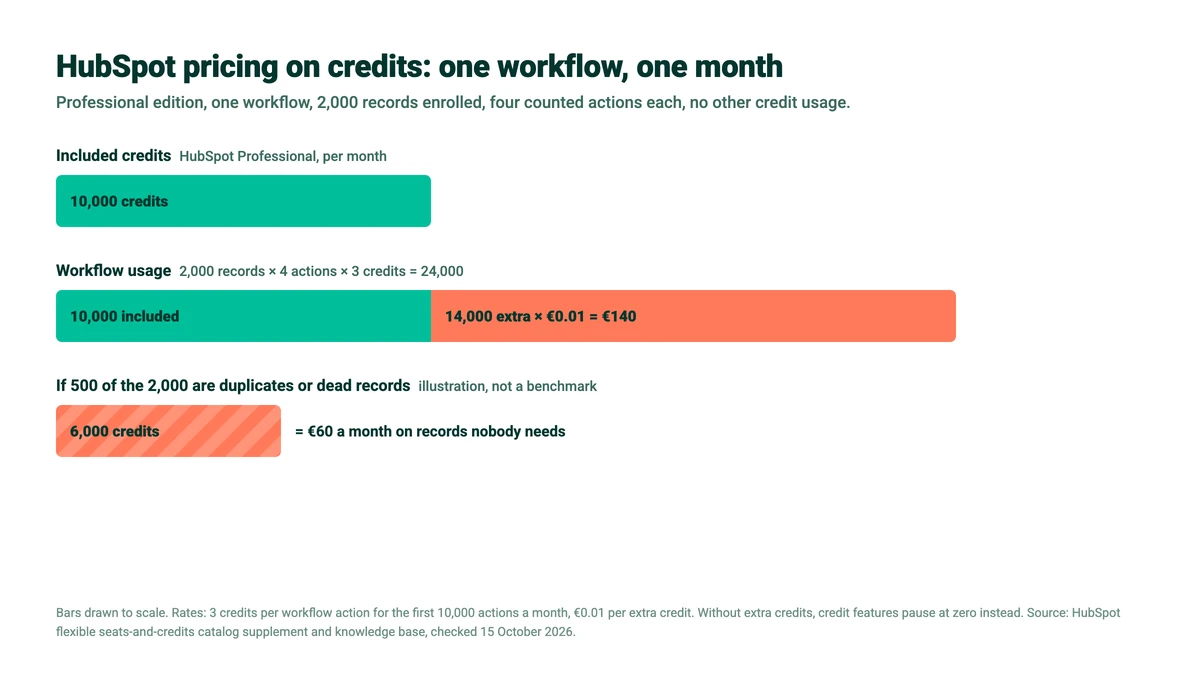
Take a Professional account with no other credit usage. A workflow enrolls 2,000 records a month and runs four counted actions on each: set a property, create a task, send an internal notification, and create a Jira work item through an integrated app action.
- 2,000 records × 4 actions = 8,000 workflow actions
- All 8,000 fall in the first tier: 8,000 × 3 = 24,000 credits
- Professional includes 10,000, so 24,000 − 10,000 = 14,000 extra credits
- 14,000 × €0.01 = €140 for the month, or a pause once the 10,000 are gone if you have not bought extra credits
Now suppose a quarter of those 2,000 records are duplicates or long-dead contacts that still match the enrollment criteria. That is an illustration, not a benchmark, but the arithmetic is simple: 500 records × 4 actions × 3 credits = 6,000 credits, or €60 a month spent processing data nobody wants. Under the old HubSpot pricing, a messy database was untidy. Under credits, the mess has a unit cost.
CRM context in Jira, without buying HubSpot seats
HubSpot for Jira is licensed on Jira users, not HubSpot seats. Contacts, companies, deals and tickets inside the work item. Free for up to 10 Jira users.
What HubSpot pricing means for HubSpot and Jira teams
If HubSpot and Jira are connected through HubSpot for Jira, HubSpot pricing on credits touches three things: the workflows that send work to Jira, the people who need CRM context but not a HubSpot login, and duplicate records.
HubSpot workflows that create Jira work items now use credits
On the HubSpot side, HubSpot for Jira adds a workflow action under Integrated apps. It runs the rule you configured in Jira, for example creating a Jira work item when a deal reaches a stage. HubSpot counts every workflow action except branches, delays and go-to actions, so on a seats-and-credits account each run costs credits like any other action, per enrolled record.
That is no reason to avoid the automation, only a reason to enroll precisely. Trigger on the event that actually matters, such as a deal stage change, rather than on any property edit, and add enrollment filters so closed or test records never enter. Our guide to auto-creating Jira work items when deals change walks through the rule itself.
Jira-side automation runs in Jira
The opposite direction works differently. The six Jira-to-HubSpot actions, such as Create New HubSpot Object or Link or Create and Link HubSpot Object, run inside Jira automation (now branded Flows), not as HubSpot workflows. They count against your Jira automation usage, not HubSpot’s workflow action rate. As of HubSpot’s knowledge base update of 13 October 2026, the list of credit-consuming features does not include these API-driven record creations, so this direction does not appear on the HubSpot pricing rate sheet. Check again if your volumes are large, because the catalog can change during the limited release.
CRM context for people who do not need a HubSpot seat
Engineers, product managers and support agents often need to see which customers a work item affects, but have no reason to work in HubSpot. Under the new HubSpot pricing, a GTM seat starts at €100 per month on Professional, so a seat each for read access is an expensive answer. HubSpot for Jira is licensed per Jira user: free up to 10 users, and $550 a year list for 50 users (Atlassian Marketplace, October 2026). Jira users can search, view and link contacts, companies, deals and tickets, and create new HubSpot records, without a HubSpot seat. More on that model in license-free CRM insights in Jira.
Be clear about the limit, though. HubSpot records shown in Jira are read-only, and HubSpot for Jira never updates an existing HubSpot record. Anyone who needs to edit deals or run campaigns still needs a HubSpot seat. Check too what read-only access your own HubSpot contract includes before you compare costs.
Duplicates cost more than they used to
Under credit-based HubSpot pricing, every duplicate contact or company that enters a workflow is charged like a real one. On the Jira side, Link or Create and Link HubSpot Object searches for an existing record by its identifier (Email for contacts, Company Name for companies, Deal Name for deals, Ticket Name for tickets) before creating one. Using it instead of a plain create action keeps Jira automation from feeding new duplicates into the CRM you are now paying per action to process.
HubSpot pricing checklist before your next renewal
Six steps that make HubSpot pricing predictable, whichever model you end up on:
- Confirm which model you are on. Existing contracts stay as they are for now. Ask your account team when, or whether, a move is planned.
- Count your monthly workflow actions. Workflow history shows enrollments; multiply by the counted actions in each workflow, leaving out branches, delays and go-to actions.
- Count marketing emails sent from workflows twice. Once for the send, once for the action.
- Clean before you migrate. Merge duplicates and archive records nobody has touched in years, so they stop matching enrollment criteria.
- Decide between a pause and an overage. Without extra credits, features stop at zero. With them, set the spend limit deliberately.
- Map who needs a seat and who needs context. People who only read CRM data from Jira may not need a GTM seat at all.
For the Jira side of the connection, the HubSpot for Jira documentation covers installation and getting started.
HubSpot pricing FAQ
Does the new HubSpot pricing apply to existing customers?
Not yet. Existing customers stay on their current contracts, and HubSpot partners report the seats-and-credits model opened to new EMEA customers on 1 October 2026. HubSpot’s catalog reserves the right to move legacy subscriptions to current products later, so check with your account team before renewal.
What uses HubSpot credits?
Workflow actions, emails sent through HubSpot, AI agents, calling minutes above included capacity, WhatsApp templates, accepted quotes, intent signals and some data features. Every workflow action counts except branches, delays and go-to actions. One-to-one emails from a connected inbox do not use credits.
What happens when you run out of HubSpot credits?
If you only have included credits, features that use credits pause until the monthly reset or until you buy more. If you have bought extra credits, usage beyond your total is billed at €0.01 per credit, up to an account spend limit set 50% above your monthly credits by default.
Do HubSpot workflows that create Jira work items use credits?
Yes, on a seats-and-credits account. The HubSpot for Jira action is an integrated app action inside a HubSpot workflow, and HubSpot counts every workflow action except branches, delays and go-to actions. Each enrolled record that reaches the action uses credits at the workflow rate.
Do Jira users need a HubSpot seat to see CRM data?
Not with HubSpot for Jira. The app is licensed per Jira user and lets Jira users search, view and link HubSpot contacts, companies, deals and tickets, and create new records, without a HubSpot seat. Records are read-only in Jira, and the app never updates an existing HubSpot record.
Related reading
- HubSpot to Jira: auto-create work items when deals change
- License-free CRM insights in Jira
- Link or create HubSpot data in Jira automatically
- Data cleaning best practices for Jira and HubSpot
Want CRM context in Jira without adding HubSpot seats? Try HubSpot for Jira on the Atlassian Marketplace, or read more on the HubSpot for Jira product page.
