Most teams assume a Jira license is consumed by the people who use Jira. It is not. Atlassian bills on product access, so an account that was granted access two years ago and has not been opened since costs exactly the same as your busiest engineer. That single mechanic explains almost every surprise on a renewal invoice, and it is the reason User Management and License Optimizer exists.
This guide covers what actually triggers a Jira license charge, the five account types that quietly consume seats, which users are genuinely free, and how to audit the whole thing in about an hour. If you want the tier prices rather than the mechanics, our breakdown of Jira pricing plans has the current numbers.
Quick answer: A Jira license is consumed by product access, not by activity. Atlassian counts a user from the moment they are given access to the app, even if they never accept the invite or log in. Billing stops only when you remove their product access, suspend the account, or remove the user.
- What actually triggers a Jira license charge
- 5 account types quietly consuming a Jira license
- Which users do not need a Jira license
- How to audit your Jira license in under an hour
- Jira license FAQ
What actually triggers a Jira license charge
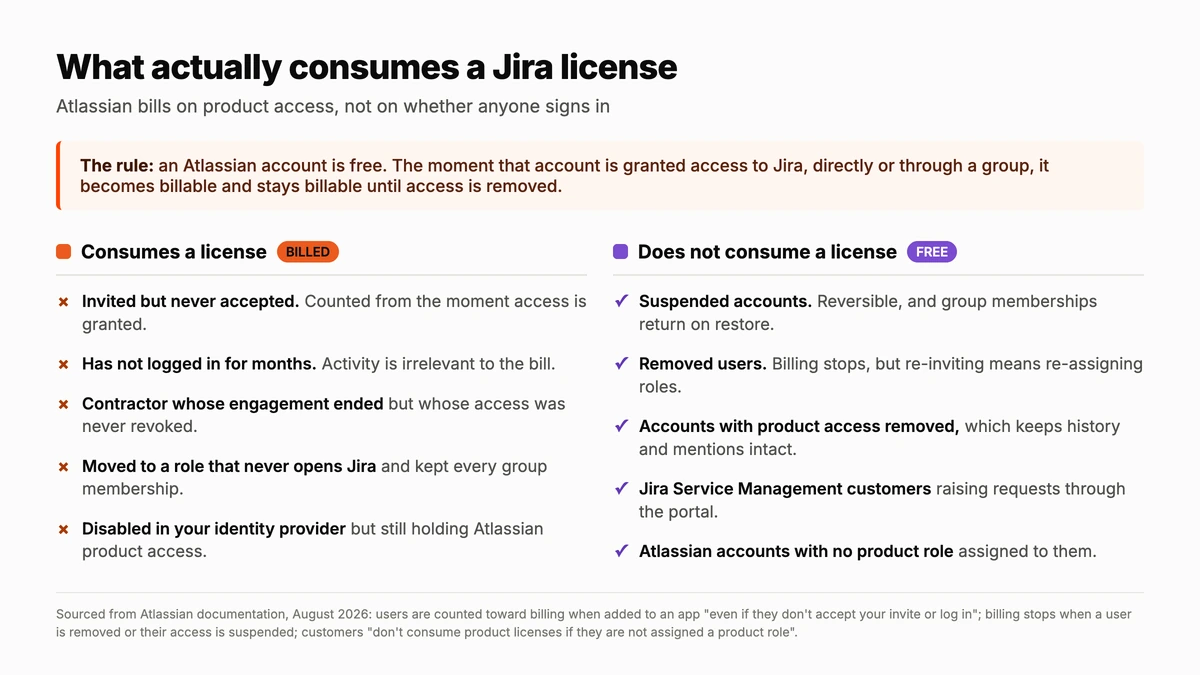
An Atlassian account on its own is free. It becomes billable the moment it is granted access to a product. Atlassian states this plainly in its billing documentation: when users are added to an app, they are counted towards billing “even if they don’t accept your invite or log in”.
The same principle works in reverse, and it is the useful half. Atlassian’s own documentation on customer accounts confirms that users “don’t consume product licenses if they are not assigned a product role”. Access is the switch. Everything else, including last login date, project membership and permission schemes, is irrelevant to what you are charged.
There is one more wrinkle that catches large organizations. Product access is usually granted through group membership rather than user by user. Somebody added to a default group inherits Jira access without any admin explicitly deciding to license them, and nothing in the interface flags that a seat was just consumed.
5 account types quietly consuming a Jira license
These five patterns account for most of the waste we see in Atlassian Cloud organizations. None of them look like errors in the admin console, which is precisely why they persist.
1. Invited, never accepted
Somebody bulk-invites a department ahead of a rollout. Half of them never accept. Every one of those pending accounts is billed from the moment access was granted, because Atlassian counts on invitation rather than acceptance.
2. The contractor who finished last quarter
Contractor offboarding tends to be owned by whoever hired them rather than by IT. The laptop comes back and the VPN account is closed, but the Atlassian account keeps its Jira access indefinitely.
3. The internal mover
Someone transfers from engineering to a role that never opens a work item. They keep every group membership they have ever accumulated, and each one that grants product access keeps consuming a Jira license.
4. Disabled in the identity provider, active in Atlassian
This is the dangerous one, because it looks solved. Disabling an account in Entra ID or Okta stops the person signing in, but unless deprovisioning is genuinely wired through to Atlassian, the product access remains and so does the charge. It is also a security exposure, not only a cost one.
5. The seasonal or occasional user
Auditors, interns, board members and seasonal staff who need Jira for a few weeks a year hold a full seat for twelve months. This is usually a genuine oversight rather than waste, but it is worth pricing consciously rather than by accident.
Find every seat you are paying for by mistake
User Management and License Optimizer shows active and inactive users across every site in your Atlassian organization, filters them by inactivity, role, group and domain, then reclaims the seats on a schedule.
Which users do not need a Jira license
Just as useful as knowing what costs money is knowing what does not. Four categories are genuinely free, and the last one is the lever most teams underuse.
| Action | Stops the charge | Keeps their history | Reversible |
|---|---|---|---|
| Remove product access | Yes | Yes | Yes, re-grant access |
| Suspend the account | Yes | Yes | Yes, roles and groups return on restore |
| Remove the user | Yes | Yes | Only by re-inviting and re-assigning everything |
| Disable in your identity provider only | No | Yes | n/a |
Jira Service Management customers are free. Anyone raising requests through the portal does not need a Jira license at all. Atlassian is explicit that regardless of account type, customers “don’t need a product license” to use the help centre, read knowledge base articles or send requests. If you have licensed people purely so they can file tickets, that is a straightforward saving.
Atlassian accounts with no product role are free. An account can exist in your organization indefinitely without consuming anything, as long as no product access is attached to it.
Suspended and removed users are free. Atlassian’s documentation confirms billing stops in both cases: “You won’t be billed for a user when their access is suspended”. Suspension is the gentler option, since roles and group memberships come back automatically when you restore the account.
How to audit your Jira license in under an hour
A first pass does not need a project plan. It needs a list, a threshold and a decision about what to do with the exceptions.
- List everyone holding product access, per product. Not everyone with an account. The two numbers are usually further apart than people expect.
- Sort by last active date. Anything past 90 days is worth a look. Anything that has never been active is worth an immediate decision.
- Separate the exceptions before you act. Service accounts, integration users, seasonal staff and executives who log in quarterly all need an exclusion group, or your first cleanup generates a queue of angry tickets.
- Prefer removing product access over suspending. It frees the seat while leaving the person able to sign in, and their comments, mentions and history stay intact either way.
- Fix the inflow, not just the backlog. A one-off cleanup buys back a number that starts climbing again the next day. Offboarding needs to actually reach Atlassian.
- Schedule the recurring pass. A saved filter for “no activity in 90 days, excluding service accounts”, run monthly, keeps the count flat between renewals.
Steps one, two and six are the work that User Manager automates. Filters run across every site in the organization at once, scheduled tasks apply the action, and every run is logged for audit. Organization Administrators are excluded from automated actions by default and that protection cannot be overridden, which is what makes scheduled cleanup safe to switch on. Two caveats worth knowing before you start: bulk operations cannot be automatically undone, so test on a small group first, and SCIM-provisioned groups are read-only, so changes to those must happen in your identity provider.
Timing matters more than most teams realize. Seat reductions want to land before an annual commitment renews, not a month into it. If your renewal is approaching, the audit is the highest-value hour available to you.
Jira license FAQ
What counts as a Jira license?
A Jira license is consumed by any user granted product access to Jira, whether directly or through a group. Atlassian counts them from the moment access is granted, regardless of whether they accept the invite or ever log in.
Do inactive users consume a Jira license?
Yes. Activity has no bearing on billing. An account that has not been opened in a year costs the same as a daily user until you remove its product access, suspend it, or remove the user.
Does deactivating a user in my identity provider stop the Jira license charge?
No, and this is a common and expensive assumption. Disabling an account in Entra ID or Okta prevents sign-in, but the Atlassian product access remains and continues to be billed unless deprovisioning is wired through to Atlassian.
Do Jira Service Management customers need a Jira license?
No. Customers raising requests through the portal do not need a product license to use the help centre, view knowledge base articles or send requests. Only agents working the requests consume licenses.
What is the difference between suspending a user and removing product access?
Removing product access frees the seat while leaving the account able to sign in to other Atlassian products. Suspending disables the account across the organization. Both stop the billing and both preserve the person’s history and mentions.
Related reading
- Jira pricing plans in 2026: what every tier really costs
- Atlassian Cloud billing: stop paying for access you do not need
- Free Jira and Confluence licenses by deactivating inactive users
- Safe Atlassian offboarding: revoke access without losing data
Want to see how many of your seats are idle right now? Start a free trial of User Management and License Optimizer on the Atlassian Marketplace.