

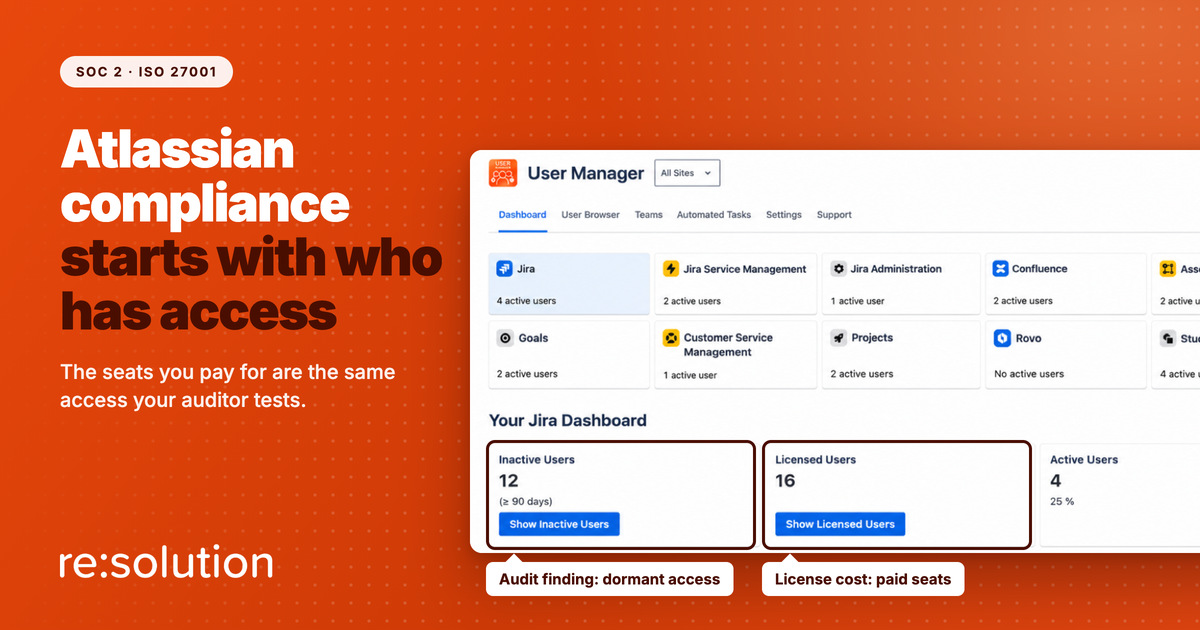
Atlassian compliance is the part of a SOC 2 or ISO 27001 audit that most teams assume is already handled. Atlassian holds the certificates, so Jira and Confluence must be covered. They are not, or at least not the part your auditor will test. Atlassian’s reports cover how Atlassian runs its cloud. Who holds access to your sites, why, and for how long is your control, and it is exactly where findings come from. It is also where User Management and License Optimizer earns its place, because the idle seat you pay for and the dormant account an auditor flags are usually the same row in the same list.
This guide covers where the line between Atlassian’s controls and yours actually sits, which SOC 2 criteria and ISO 27001 Annex A controls land on Atlassian user management, the five gaps auditors find most often, and the evidence that closes them. If you are new to how seats are billed, our guide to which users actually consume a Jira license explains the mechanics first.
Quick answer: Atlassian compliance for SOC 2 and ISO 27001 depends on your own access controls, not Atlassian’s certificates. Auditors test whether leavers lose access promptly, whether access is reviewed and evidenced, and whether privileged and dormant accounts are controlled. License optimization runs on the same user data, so cleaning up idle seats produces audit evidence too.
- Where Atlassian’s compliance ends and yours begins
- Which SOC 2 and ISO 27001 controls apply to Atlassian users
- Why license optimization is an Atlassian compliance control
- 5 Atlassian compliance gaps auditors find
- How to build Atlassian compliance evidence that holds up
- Atlassian compliance FAQ
Where Atlassian’s compliance ends and yours begins
Atlassian does carry the paperwork. Its Compliance Resource Center lists SOC 2 reports for Jira, Confluence, Jira Service Management and Atlassian Guard Premium among others, and an ISO/IEC 27001:2022 certification for the same product set. Those are real, independently audited, and worth sending to anyone who asks whether Atlassian is a safe vendor.
But read what they evaluate. Atlassian describes its SOC 2 audits as checking whether “Atlassian’s compliance controls are designed appropriately” and operating effectively. Atlassian’s controls. Not yours. Atlassian publishes a whitepaper on cloud security shared responsibilities for precisely this reason, and the customer half of that model includes deciding who gets an account, what they can reach, and when it ends.
SOC 2 reports formalize this split. A service provider’s report typically lists complementary user entity controls: things the customer must do for the provider’s controls to work as described. Managing your own users is the classic example. So when your auditor reaches Jira, they will not ask for Atlassian’s SOC 2 report and move on. They will ask for your user list.
Which SOC 2 and ISO 27001 controls apply to Atlassian users
Both frameworks describe the same discipline in different words. In SOC 2, it lives in the logical access criteria of the AICPA’s Trust Services Criteria, chiefly CC6.1 to CC6.3. In ISO 27001:2022, it is spread across a handful of the 93 Annex A controls. Here is how the work maps, and where Atlassian compliance evidence comes from for each.
| Control area | SOC 2 | ISO 27001:2022 | What the auditor asks for |
|---|---|---|---|
| Leaver deprovisioning | CC6.2 | A.5.18, A.6.5 | Leavers in the period, and the date each lost product access |
| Mover changes | CC6.3 | A.5.15, A.5.18 | Group and product access matching the current role |
| Periodic access review | CC6.2, CC6.3 | A.5.18 | A dated review, a named reviewer, and the changes it triggered |
| Privileged access | CC6.1, CC6.3 | A.8.2 | Who holds admin roles, and why |
| Identity lifecycle | CC6.2 | A.5.16 | An inactivity rule, and proof it is enforced |
| Asset and license inventory | CC6.1 | A.5.9 | What you license, per product, and who uses it |
Two things stand out. First, nearly every row is about the same object: the list of who has access to what. Second, nothing in either framework sets a fixed frequency. ISO 27001 asks for access rights to be reviewed at regular intervals, and SOC 2 asks you to define and follow your own controls. That means your policy sets the bar, and your auditor holds you to it. Write “quarterly” and miss a quarter, and that is a finding.
Why license optimization is an Atlassian compliance control
Finance and security usually treat these as two projects. They are one list, read twice.
Atlassian Cloud bills on product access, not on logins. An account that has not been opened in six months still holds a paid seat if it holds product access. To finance, that row is waste. To an auditor, the same row is a dormant account with live access to your issues, your pages and possibly your customers’ data, belonging to someone whose role may have changed or ended. Fix it once and both problems go away.
This is why Atlassian compliance work is easier to fund than most security projects. Reclaiming idle seats has a number attached, and resolution’s product claim for User Manager is that most organizations see 15 to 30% lower Atlassian license costs. The same filter that finds those seats produces the dormant-account evidence, so the compliance benefit arrives without a second budget line.
It works the other way too. A license cleanup run once before renewal is a cost exercise. Run on a schedule, with a written threshold and logged results, it becomes a control you can show an auditor.
5 Atlassian compliance gaps auditors find
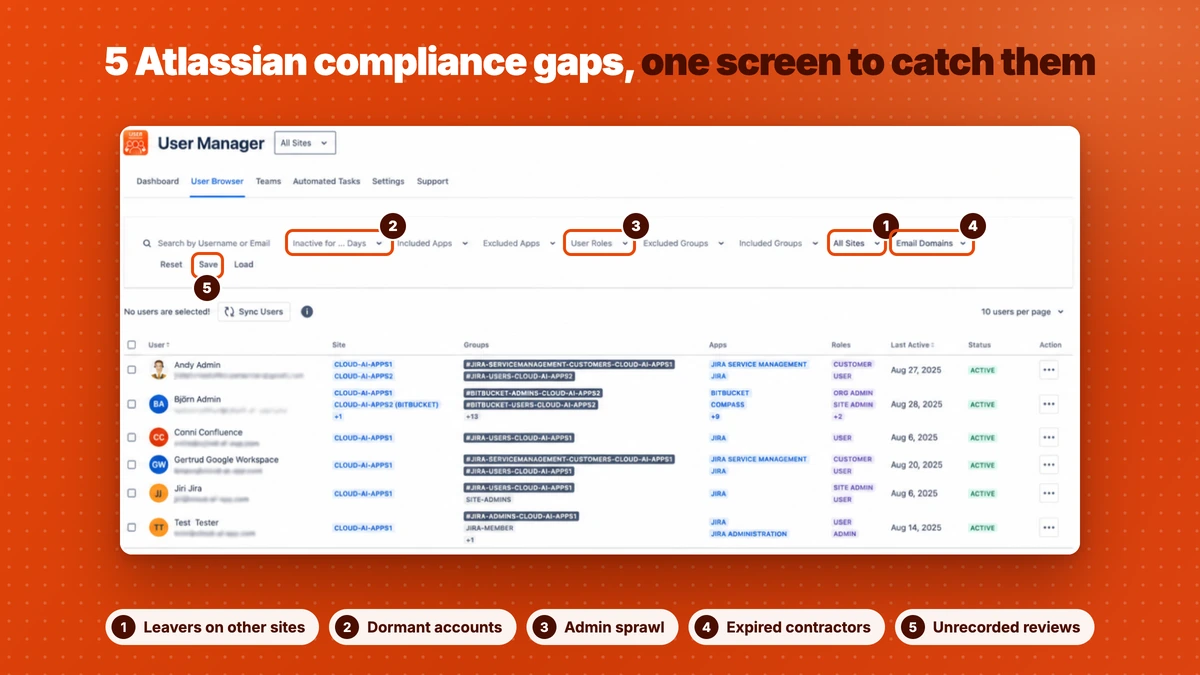
These come up because native Atlassian administration is built for managing users one site at a time, while auditors sample across your whole estate.
1. Leavers who keep product access
HR closes the record on Friday. The identity provider disables the account on Monday, if it is connected. Jira access on the second site, added by hand for a project last year, stays until someone notices. Auditors sample leavers and compare dates, and the gap between “left” and “access removed” is the finding. Our guide to safe Atlassian offboarding covers revoking access without losing their work.
2. Dormant accounts nobody owns
The account is not a leaver. It is a colleague who stopped using Confluence a year ago, a test account, a service user from a retired integration. No process removes it because no event triggers one. An inactivity rule, enforced on a schedule, is the only control that catches it.
3. Admin sprawl
Site admin was granted to unblock someone during a migration and never taken back. Privileged access is sampled more heavily than ordinary access in most audits, and “we did not know they were still admin” is a hard answer to give in an Atlassian compliance audit.
4. Contractors who outlive their contracts
External users are the easiest Atlassian compliance gap to miss, because they are not in your HR system at all. Filtering by email domain, such as everyone at @contractor.com, is often the fastest way to find access that should have ended with a statement of work.
5. Access reviews without evidence
The review happened. Someone scrolled the user list in a meeting and agreed it looked fine. Without a dated record of what was reviewed, by whom, and what changed as a result, an auditor cannot test it, and an untestable control counts as a missing one.
The common thread in Atlassian compliance gaps
All five are multi-site visibility problems. Each Atlassian site has its own users, groups and admins, so a review done site by site is slow, and slow reviews get skipped. A single view across every site in the organization is what makes the review cheap enough to actually run.
One list for your auditor and your finance team
User Management and License Optimizer shows every user across every site in your Atlassian organization, filters by inactivity, role, group, site and email domain, and removes access on a schedule. Every run is logged with downloadable results, and Organization Administrators are excluded from automated actions automatically.
How to build Atlassian compliance evidence that holds up
The goal is a control an auditor can test from records alone, without anyone having to remember what happened. Six steps get you there.
- Write the rule down. State the inactivity threshold (for example, six months without activity), what happens when it is crossed (remove product access, or suspend), how quickly leavers lose access, and how often access is reviewed. Your auditor tests you against this document, so make it something you can meet.
- Build one view across every site. In User Manager, the User Browser filters every user in the organization by inactivity, product, role, group, site and email domain. Save the filters that express your policy, such as “inactive for 6 months” or “external domains”, so the same definition is used every time.
- Review privileged roles separately. Filter by Org Admin, Site Admin and User Access Admin, confirm each one, and record the outcome. This is the A.8.2 and CC6.3 evidence.
- Enforce on a schedule, not on memory. Point an automated task at the saved filter, set it to run weekly or monthly, and choose the reversible action: remove app access or suspend. A scheduled task turns a one-off cleanup into an operating Atlassian compliance control.
- Keep the records outside the tool. Each run logs skipped and failed users, and results download as JSON. Logs are kept for 3 months on Standard and 6 months on Advanced, which can be shorter than a SOC 2 Type II period, so file the results in your evidence repository after each run.
- Record the sign-off. The reviewer, the date and the decision belong in your ticketing or GRC system. A Jira issue per quarterly review, with the results attached, is simple and auditable.
The User Manager documentation covers saved filters and automated tasks step by step, and the product overview shows the dashboard and task logs.
What this does not cover, honestly
Auditors respect a clear scope more than a broad claim, so here are the edges of what User Manager does for Atlassian compliance.
- It is not a certification workflow. User Manager finds and changes access. It does not route reviews to managers for sign-off, so step six happens in your own system.
- The app’s own permissions are broad. Any role granted access to User Manager gets organization-wide capability, because granular in-app permissions are still on the roadmap. Keep the list of people who can run it short, and include it in your privileged access review.
- Bulk operations cannot be automatically undone. Test on a small group first and keep the downloadable results.
- SCIM-provisioned groups are read-only. If your identity provider owns a group, changes to it have to happen there.
- The User Browser list itself does not export yet. Today the evidence is the saved filter definition plus the JSON results of each action. List export is on the roadmap.
- Atlassian’s organization audit log is separate. It records admin activity across your organization, and it requires Atlassian Guard Premium or Cloud Enterprise. If you have Guard, continuous sync also narrows the gap between a change in Atlassian and User Manager seeing it.
Atlassian compliance FAQ
Is Atlassian Cloud SOC 2 and ISO 27001 compliant?
Atlassian holds SOC 2 reports and ISO/IEC 27001:2022 certification for its main cloud products, including Jira and Confluence. Those cover Atlassian’s own controls. Your audit separately tests the controls you operate, and managing who has access to your Atlassian sites is one of them.
What do SOC 2 auditors check in Jira and Confluence?
Mostly logical access under criteria CC6.1 to CC6.3. Expect requests for leavers and the date each lost access, evidence of periodic access reviews, a list of admin role holders, and proof that inactive or unneeded access is removed according to your written policy.
Which ISO 27001 controls apply to Atlassian user management?
In ISO 27001:2022, the main ones are A.5.15 access control, A.5.16 identity management, A.5.18 access rights, A.8.2 privileged access rights, A.6.5 responsibilities after termination, and A.5.9 inventory of assets, which covers what you license and who holds it.
How often should Atlassian user access be reviewed?
Neither framework fixes a number. ISO 27001 asks for reviews at regular intervals and SOC 2 tests you against your own policy. Quarterly is a common choice, often with privileged roles reviewed more often. Choose a frequency you can sustain, because a missed review is a finding.
Does license optimization help with Atlassian compliance?
Yes. Atlassian Cloud bills on product access, so an idle paid seat is usually also a dormant account with live access. Removing it on a schedule, against a written inactivity rule and with logged results, reduces cost and produces the evidence auditors look for at the same time.
Related reading
- Safe Atlassian offboarding: revoke access without losing data
- Free Jira and Confluence licenses by deactivating inactive users
- Which users actually consume a Jira license (and which do not)
- Webinar: driving compliance and license efficiency in Atlassian Cloud
Your auditor and your finance team are looking at the same list. Start a free trial of User Management and License Optimizer on the Atlassian Marketplace and see who still has access right now.
