





Integrate your
boards into Jira
Integrate your
boards into Jira
Embed monday.com for Jira can help your company to combine silo’d workflows to increase collaboration and efficiency.
BENEFITS
Check out the Benefits
User Adoption
User excel at adopting their individual platforms by having access to complete data, without being gated.
Stay Informed
Calendars, charts, timelines, boards and items. Make your live operations part of your workflows.
Mitigate License Costs
Keep everyone on the same page across teams and departments with a reasonable license count.
Complete Access
Allow users to engage with other teams’ platforms in a whole new way.
Cross Collaboration
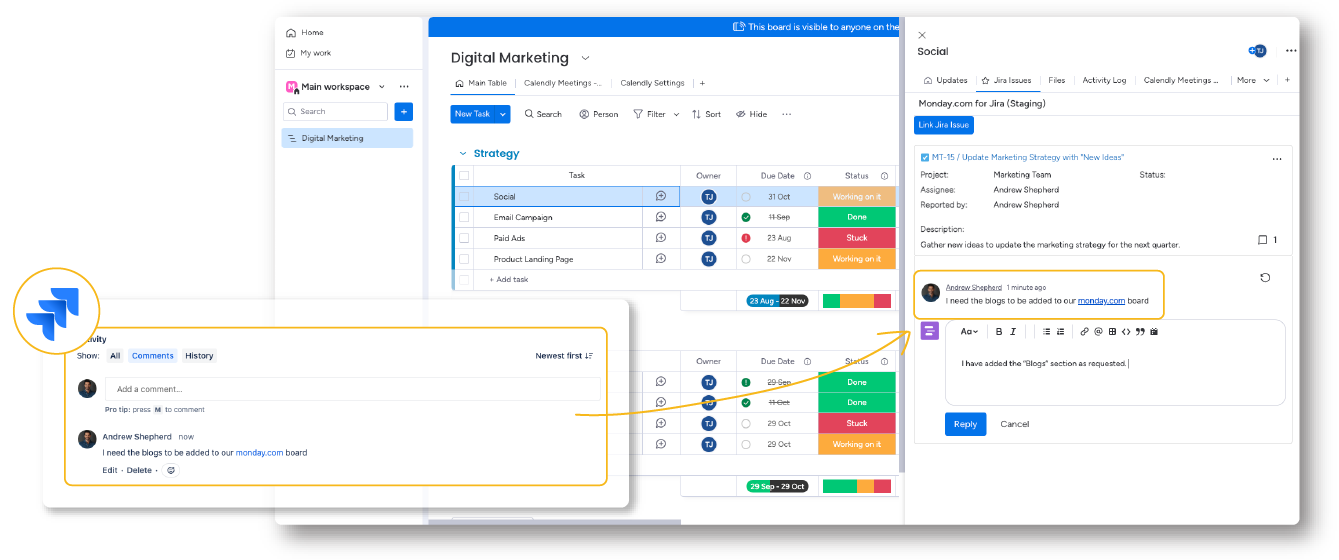
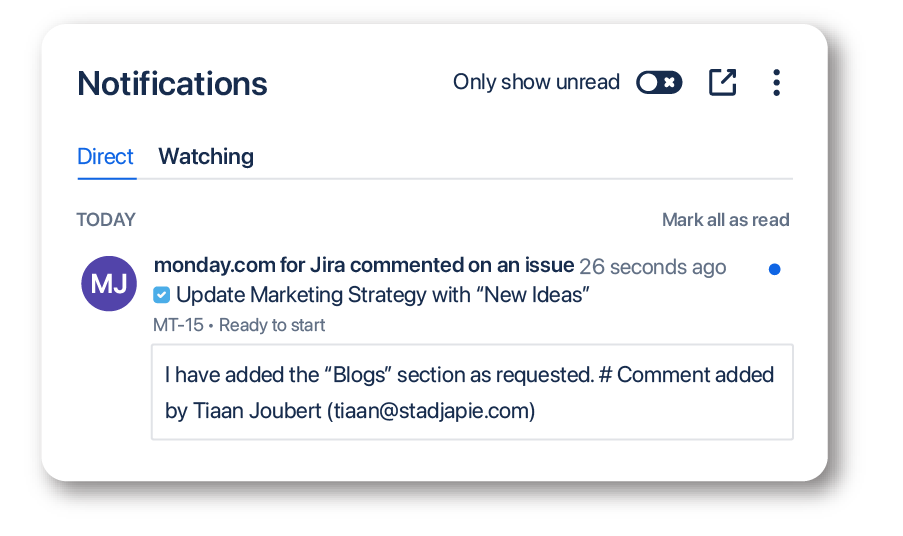
Having a two-way sync between monday.com and Jira enables teams to work closer together and accelerates internal communication.
Keep Data Safe
Create a connection between monday.com and Jira where permissions are adjusted for an extra level of security.
FEATURES
Check out the Features
Access to monday.com boards and items
Embed monday.com boards and items into Jira issues or link Jira issues to monday.com items.
INTEGRATE YOUR MONDAY.COM BOARDS IN JIRA
Publishing monday.com on Jira will change the way your company shares and gets feedback.
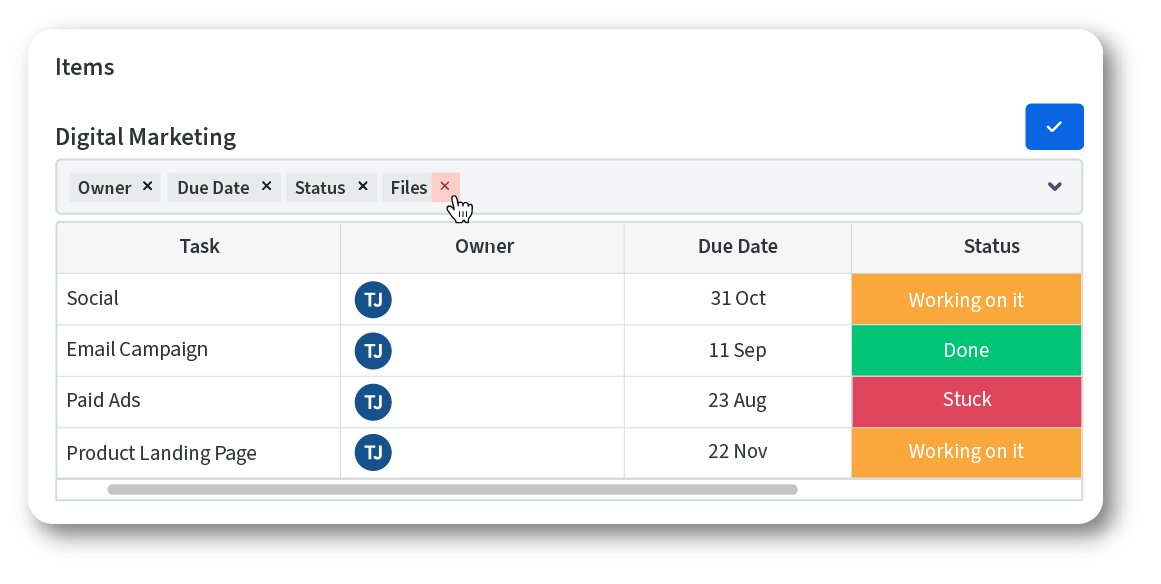
Customize your tables
Decide how you consume monday.com data in Jira by customizing the column views.
Define user permissions
Determine who has access to the monday.com data by setting up user group permissions for an extra layer of security.
How it works
Usable for every user in seconds
Connect
Connect your Jira and monday.com instances
Share
Share monday.com boards and items within Jira and Jira work items in monday.com.
Collaborate
Communicate across both platforms and collaborate with real-time data.
Check out what monday.com for Jira can do for you!
Get started today
Download the monday.com for Jira App from the Atlassian Marketplace to start your evaluation. To discuss specific requirements, please book a support session with us.
Frequently Asked Questions (FAQ)
Yes, multiple boards, as well as multiple items can be linked to a single Jira issue.
Updates are reflected in real-time, as long as they are saved, they will automatically update within Jira as well.
The integration aims to provide seamless collaboration between monday.com and Jira Cloud by allowing users to publish monday.com items and boards in Jira Cloud, facilitating cross-team communication and keeping stakeholders updated.
Yes, new Jira issues can be created within monday.com, or existing issues can be linked to monday.com items from within monday.com.
Once the table is embedded, click the “Pencil” icon in the monday.com panel, and click on the “x” next to the column name to remove columns. Click on the dropdown to see new columns that are available to add.
Yes, cross-platform communication via comments is possible and can be viewed in both Jira and monday.com.
Yes, embedded monday.com boards and items in Jira are viewable to Jira users, enhancing collaboration even if they do not have a monday.com account.
Yes, you can embed monday.com Charts within Jira to provide insights and analytics directly, aiding in performance tracking and decision-making.
No, Jira users only have view/read permissions when accessing embedded monday.com boards within Jira.
Yes, user permissions can be defined during the setup process of monday.com for Jira app.
More Integration Apps
monday.com
for Confluence
Visualize and share your boards in Confluence.
monday.com
for Jira
Visualize and share your boards in Jira.

HubSpot CRM
for Confluence
Integrate your boards into Confluence.

HubSpot CRM
for Jira
Issue Link Integration & Collaboration

Smartsheet
for Confluence
Scale your project
execution.

Miro
for Confluence
Freely navigate whiteboards together.

Power BI
for Confluence
Surveys, results and your team all under one tab.
PDF Embed
for Confluence
Embed your PDF documents in Confluence